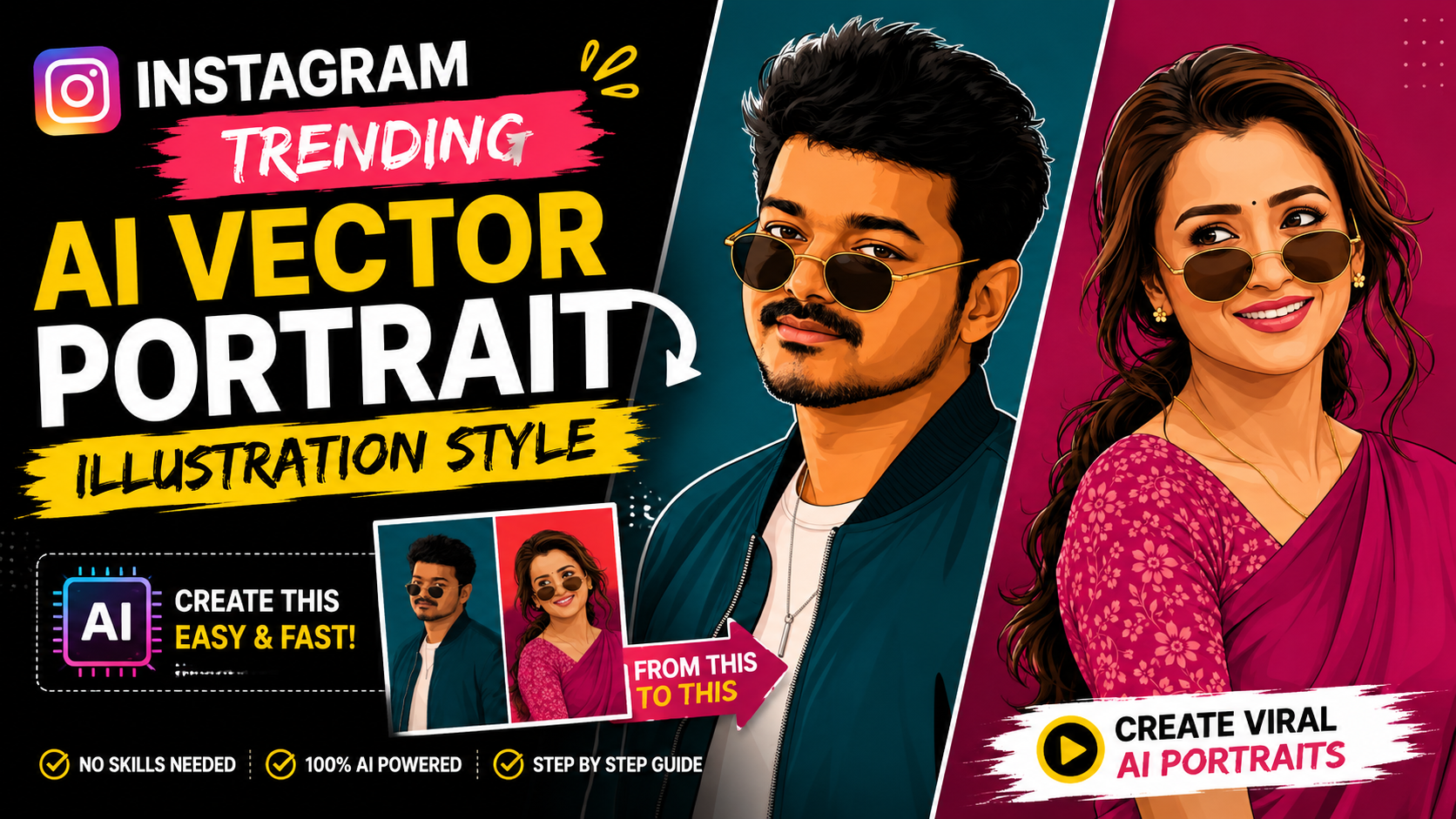
Instagram Trending AI Vector Portrait Illustration Style
Instagram is constantly introducing new photo-editing trends, and one of the styles getting a lot of attention right now is the AI Vector Portrait Illustration Style.
You may have seen portraits on Instagram where a normal photograph has been transformed into a clean, stylish digital illustration. The face still looks recognizable, but the entire image has a professional illustrated appearance with smooth outlines, detailed hair, realistic facial proportions, layered shading, and a clean background.
This is not simply a normal cartoon filter.
Instead, AI can analyze your original photograph and recreate the entire portrait as a digital vector-style illustration.
The best part is that you don’t need professional Photoshop skills or advanced graphic-design knowledge to try this style. With a good photo, a suitable AI editing tool, and the right instructions, you can create a similar-looking portrait directly from your mobile phone.
What Is the Instagram Trending AI Vector Portrait Illustration Style?
The style can be described as:
AI Vector Portrait Illustration Style
It is also commonly described using terms such as:
- AI Digital Portrait
- Vector Portrait Illustration
- Semi-Realistic Vector Portrait
- Digital Vector Artwork
- AI Portrait Illustration
- Flat Digital Portrait
- Poster-Style Digital Illustration
The main idea is to transform a real photograph into a polished digital artwork while maintaining the important visual characteristics of the original person.
Instead of simply applying a cartoon filter over the photo, the AI recreates the portrait using digital illustration techniques.
The final result can look like a professionally designed digital portrait rather than an ordinary edited photograph.
Why Is This Style Trending on Instagram?
Social media users are always looking for new ways to make their profile pictures, posts, Reels covers, and personal photos look different.
A normal selfie can look very ordinary.
But when the same photo is transformed into a stylish digital portrait, it immediately gets a completely different visual appearance.
The strong colors, clean outlines, detailed hair, smooth facial shading, and simple background make this style especially suitable for social-media content.
It can be used for:
- Instagram Profile Pictures
- Instagram Posts
- Instagram Stories
- Reels Covers
- YouTube Thumbnails
- WhatsApp DP
- Facebook Profile Pictures
- Posters
- Personal Branding
- Fan Art
- Digital Invitations
Because the artwork looks clean even at smaller sizes, it can work particularly well for profile pictures and social-media thumbnails.
What Makes This Vector Portrait Style Different?
There are several visual characteristics that make this editing style different from a regular photo filter.
1. Recognizable Facial Features
One of the most important parts of the style is maintaining the person’s recognizable appearance.
The AI should use the original photograph as a subject reference and preserve important characteristics such as:
- Face shape
- Eyes
- Eyebrows
- Nose
- Lips
- Jawline
- Hairstyle
- Facial hair
- Skin tone
- Overall facial proportions
The goal is not to turn the person into a completely different cartoon character.
Instead, the photograph should be transformed into an illustrated version of the same portrait.
2. Clean Digital Linework
Another major feature is the clean linework.
The face, hair, clothing, glasses, jewellery, and other elements are represented using smooth digital outlines.
This creates a polished vector-art appearance.
The lines should look intentional and clean rather than rough pencil strokes or traditional hand-drawn sketch marks.
3. Semi-Realistic Digital Shading
The style is not completely flat.
Different layers of digital shading can be used to create depth around the face, cheeks, nose, neck, hair, and clothing.
This creates a balance between:
Realistic Portrait + Digital Illustration
That is why the final result can look more premium than a simple cartoon filter.
4. Detailed Hair
Hair is another important part of this style.
Instead of representing the hair as one solid color, the AI can create individual digital strokes, highlights, shadows, and layered shapes.
This works especially well for:
- Curly hair
- Wavy hair
- Long hair
- Short hair
- Messy hairstyles
- Modern hairstyles
Detailed hair can make the entire illustration feel much more sophisticated.
5. Natural Skin Tone
Maintaining a natural skin tone is also important.
An AI-generated portrait can sometimes change the person’s complexion too much.
For a better result, the original skin tone should remain consistent while subtle digital highlights and shadows are added.
This helps the portrait retain the overall appearance of the original photograph.
6. Sunglasses and Accessories
Sunglasses, earrings, chains, watches, and other accessories can also become part of the illustration.
A good AI-generated result should make these elements look like they were digitally illustrated together with the portrait.
They should not look like separate objects copied from the original photograph and pasted onto a colored background.
This Is More Than a Photo Filter
One of the biggest differences between this trend and traditional editing is the way the image is transformed.
A traditional filter might work like this:
Original Photo → Filter → Color Adjustment → Final Photo
The photograph remains essentially the same.
AI Vector Portrait Illustration works differently:
Original Photo → AI Analysis → Facial Feature Reconstruction → Hair & Clothing Illustration → Digital Shading → Vector-Style Rendering → Final Artwork
The entire portrait is recreated as a digital illustration.
This is why the final image can look like a professional digital artwork instead of a normal photograph with an effect applied.
How Easy Is It to Create This Style?
The process can be surprisingly simple.
You don’t necessarily need:
- Photoshop
- Illustrator
- Advanced drawing skills
- Professional graphic-design knowledge
Instead, you can use an AI image-editing or image-generation application that supports image references.
The basic process is:
Step 1: Choose a Good Photo
Start with a clear, high-quality portrait.
A photo where the face is clearly visible generally gives the AI more information to work with.
Try to avoid extremely blurry, heavily compressed, or very dark photographs.
Step 2: Upload Your Photo
Upload the photograph to an AI image-editing tool that supports image references.
The uploaded photo should be treated as the subject or identity reference.
Step 3: Specify the Illustration Style
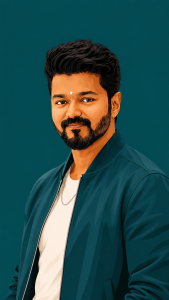
PROMPT :
Create this as a 9:16 vertical portrait image. Using the attached reference photo, recreate the person’s face with high precision — exact facial structure, eyes, nose, lips, jawline, beard/facial hair (if any), and skin tone matching the reference photo closely, side-profile or three-quarter angle as shown. Style: bold flat vector illustration, clean smooth linework, minimal shading, poster-art aesthetic — no painterly texture, crisp digital vector finish. Pose: head turned slightly to the side in a relaxed three-quarter profile, one shoulder forward, warm charming smile — natural, confident, slightly playful, eyes gently engaged. Hair styled neatly matching the reference (textured, swept back, or tousled as shown). Outfit: sharp casual-formal look — a solid-color bomber jacket or structured shirt in a single bold monochrome tone (deep teal, burnt orange, or charcoal — pick one saturated color), plain fitted t-shirt or collared shirt underneath in a lighter contrasting shade, minimal accessories (thin chain necklace or wristwatch), round or square vintage-style sunglasses pushed slightly down the nose. Background: solid bold monochrome color matching the outfit’s color family, completely flat with no texture or gradient, high contrast, poster-style minimalism. Composition: subject positioned in the lower two-thirds of the frame with headroom above, generous negative space around the head, fully filling the 9:16 vertical frame, clean poster-quality layout. Style: flat vector illustration, bold saturated color palette, minimal linework, high-fashion editorial poster quality, confident, charming, and stylish mood.
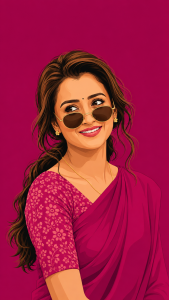
PROMPT :
Create this as a 9:16 vertical portrait image. Using the attached reference photo, recreate the person’s face with high precision — exact facial structure, eyes, nose, lips, and skin tone matching the reference photo closely, side-profile or three-quarter angle as shown. Style: bold flat vector illustration, clean smooth linework, minimal shading, poster-art aesthetic — no painterly texture, crisp digital vector finish. Pose: head turned slightly to the side in a relaxed three-quarter profile, one shoulder forward, subtle confident expression, hair styled in soft loose waves pulled into a low ponytail with a few face-framing strands. Outfit: elegant traditional saree in a single bold monochrome color family (deep teal, burnt orange, or rich magenta — pick one saturated tone), with a delicate floral-print blouse in a contrasting lighter shade of the same color family, small dainty flower-shaped stud earring, thin gold chain necklace, round vintage-style sunglasses pushed slightly down the nose. Background: solid bold monochrome color matching the outfit’s color family, completely flat with no texture or gradient, high contrast, poster-style minimalism. Composition: subject positioned in the lower two-thirds of the frame with headroom above, generous negative space around the head, fully filling the 9:16 vertical frame, clean poster-quality layout. Style: flat vector illustration, bold saturated color palette, minimal linework, high-fashion editorial poster quality, confident and stylish mood.
Step 4: Tell the AI to Recreate the Entire Image
If you want the result to look like a genuine illustration, make it clear that the entire portrait should be digitally recreated.
The face, hair, clothes, accessories, and other visible elements should belong to the same illustration style.
This helps avoid a common problem where the AI simply keeps the original photograph and adds a colored background.
Step 5: Choose the Correct Aspect Ratio
For Instagram Stories and Reels, a 9:16 vertical format works very well.
For Instagram posts, different aspect ratios can be used depending on the design.
For YouTube thumbnails and website graphics, a 16:9 landscape format may be more appropriate.
The illustration style itself does not need to change. Only the composition and canvas ratio need to be adjusted.
Why the Reference Image Is Important
Reference images can make a significant difference when creating this type of artwork.
If you have a particular illustration style that you like, you can use it as a visual style reference while using your own photograph as the subject reference.
This gives the AI two different types of information:
Style Reference:
Shows the AI how the artwork should look.
Subject Reference:
Shows the AI who or what should be recreated.
This approach can be particularly useful when you want a consistent illustration style.
Don’t Ask for a Simple Cartoon Effect
This is one of the most important tips.
If you simply tell an AI:
“Make my photo a cartoon.”
the result may look completely different from the modern vector portrait style.
You may get:
- Exaggerated facial features
- Large cartoon eyes
- Simplified hair
- Heavy outlines
- Unwanted colors
- A generic cartoon appearance
Instead, describe the visual characteristics of the artwork you actually want.
Terms such as:
vector portrait, semi-realistic illustration, clean linework, digital shading, detailed hair, natural facial structure, crisp digital artwork, poster-art finish
can help communicate the intended direction more clearly.
How to Make the Portrait Look More Premium
If you want a professional-looking result, pay attention to the small details.
Keep the Background Simple
A clean solid-color background can make the portrait stand out.
Avoid unnecessarily complicated backgrounds unless they are specifically part of the design.
Keep the Face Natural
The more natural the facial proportions are, the more recognizable the final portrait will be.
Preserve the Hairstyle
Hair contributes significantly to a person’s overall appearance.
If the original hairstyle is important, make sure the AI retains its general shape and characteristics.
Keep Clothing Consistent
If the person is wearing a jacket, saree, shirt, traditional outfit, or any other clothing, the clothing should also be recreated as part of the illustration.
Maintain Consistent Lighting
The highlights and shadows should look like they belong to the same digital artwork.
This helps prevent the image from looking like separate elements were combined together.
Can You Create This Style on a Mobile Phone?
Yes.
One of the reasons this trend is becoming popular is that users can experiment with AI image editing directly from their smartphones.
The general workflow is simple:
Take or select a photo → Upload it to an AI tool → Add the style instructions → Generate → Review the result → Refine if necessary
You may need to try more than once to get the exact result you want.
AI image generation is not always perfect on the first attempt.
Sometimes the face, hairstyle, clothing, accessories, or composition may need additional instructions.
Common Problems You May Face
Even with a good prompt, AI-generated portraits can sometimes have problems.
The Face Looks Different
The AI may slightly change facial proportions.
If this happens, reinforce the instruction to preserve the recognizable facial structure and important facial features from the reference photo.
The Result Looks Like a Filter
If the original photograph is still clearly visible and only the colors have changed, the AI has not fully recreated the artwork.
Ask for the entire portrait to be digitally illustrated, rather than simply applying a filter.
The Skin Tone Changes
If the skin tone becomes noticeably different, specify that the original natural complexion should be maintained.
Hair Becomes Too Different
If the hairstyle changes too much, emphasize that the original hairstyle should remain recognizable.
Background Becomes Too Complicated
If the AI adds unnecessary objects, colors, or scenery, request a clean, minimal background.
Best Uses for AI Vector Portrait Illustrations
Once you create the portrait, there are many ways to use it.
Instagram Profile Picture
A vector portrait can give your profile a more unique and creative appearance.
Instagram Reels Cover
Use the portrait as a visual element in your Reel cover design.
YouTube Thumbnail
An illustrated version of yourself can be useful for creating a recognizable visual identity across thumbnails.
WhatsApp DP
Replace a standard photograph with a personalized digital portrait.
Social Media Branding
Creators can maintain a consistent illustrated identity across multiple social platforms.
Posters and Designs
The portrait can also be incorporated into posters, invitations, banners, birthday designs, and promotional artwork.
9:16 AI Vector Portrait Trend
If your main goal is Instagram Reels or Stories, creating the artwork in a 9:16 vertical format is a good option.
A vertical portrait gives enough space for:
- Head and shoulders
- Upper-body composition
- Clothing details
- Background space
- Text placement
It also works well for full-screen mobile content.
Can the Same Style Be Used for Men and Women?
Yes.
The AI Vector Portrait Illustration Style is not limited to one type of portrait.
It can be adapted for:
- Male portraits
- Female portraits
- Traditional outfits
- Casual outfits
- Fashion portraits
- Couple portraits
- Professional portraits
- Creative profile pictures
The style can remain consistent while the clothing, hairstyle, accessories, pose, and background are adapted to the individual photograph.
Why This AI Editing Trend Is Useful for Creators
For content creators, one of the biggest advantages is consistency.
Once you have a particular illustration style that represents you, you can use similar artwork across different platforms.
For example:
Instagram DP → YouTube Profile → Reels Cover → Thumbnail → Website → Social Media Poster
This can create a recognizable personal visual identity.
Instead of using a different photograph everywhere, you can build a consistent illustrated identity.
Final Thoughts
The Instagram Trending AI Vector Portrait Illustration Style is a simple and creative way to transform ordinary photographs into stylish digital artwork.
Unlike a traditional cartoon filter, this style focuses on recreating the complete portrait with clean vector-like outlines, semi-realistic facial details, layered digital shading, detailed hair, natural skin tones, and a polished poster-art finish.
The process can be done with AI tools without requiring advanced Photoshop or professional illustration skills.
The most important things are a good-quality reference photo, a clear description of the desired illustration style, and instructions that tell the AI to recreate the entire portrait rather than simply applying an effect.
If you want to try this trend yourself, you can use the AI Vector Portrait Illustration Prompt provided below this article.
Upload your photo, add the prompt, generate the artwork, and experiment with different backgrounds, poses, colors, and aspect ratios to create your own unique Instagram-style AI portrait.
Your normal photo can become a stylish digital artwork with just a few AI steps.
Try the AI Vector Portrait Trend Today
Choose your favorite portrait, upload it to a suitable AI image-editing tool, use the prompt provided below, and create your own Instagram Trending AI Vector Portrait Illustration.
The result can be used as your Instagram DP, Reel cover, WhatsApp profile picture, YouTube artwork, or simply as a creative digital version of your favorite photograph.