In 2026, photo editing has become super easy thanks to AI 🤖✨
You don’t need Photoshop skills anymore!
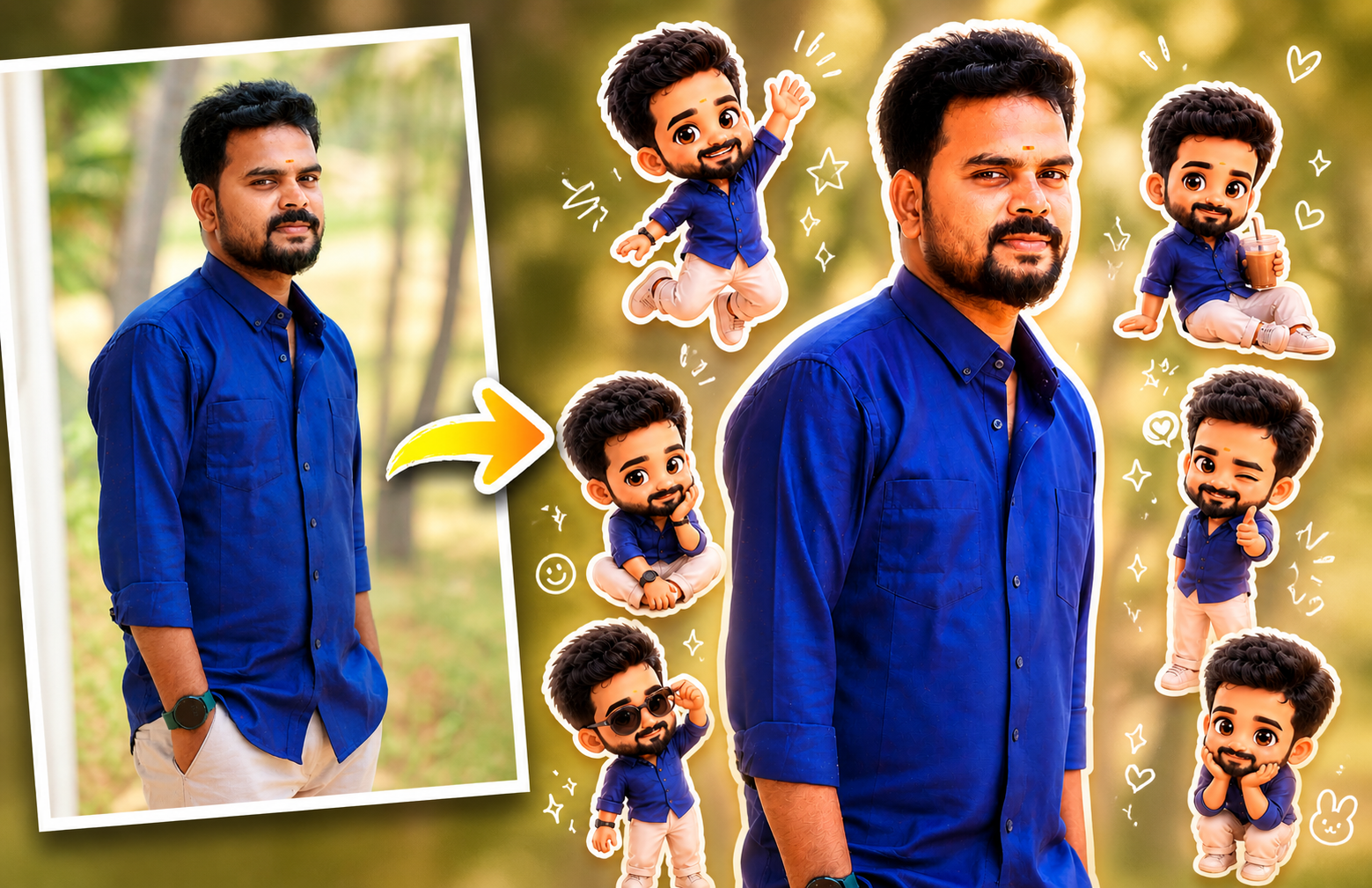
Now you can convert your normal photo into a cute, trending pop-up style edit with stickers, chibi characters, and glowing effects — all using simple AI apps 📱
✨ What is a Pop-Up AI Photo Edit?
A pop-up edit is a modern trending style where:
- 📸 Your original photo stays natural
- 🧸 Mini chibi versions of you are added
- 💖 Stickers, doodles & sparkles enhance the look
- 🌟 Final result looks fun, stylish & viral-ready
👉 This style is trending on Instagram Reels, YouTube thumbnails & DP edits 🔥
📱 Best AI Apps for This Edit
You can use these powerful AI apps:
- 📲 Remini AI – Best for face enhancement & clarity
- 🎨 PicsArt AI – Perfect for stickers & creative edits
- 🧠 Lensa AI – Great for AI avatars & stylized photos
- 🖌️ Canva AI – Easy drag-and-drop editing for beginners
👉 Available on Android & iOS ✅
🛠️ How to Create This Trending Edit (Step-by-Step)
1️⃣ Install the App 📥
Download any AI app from Play Store / App Store
2️⃣ Upload Your Photo 📸
Use a clear, high-quality image
3️⃣ Use AI Prompt ✍️
Paste this prompt 👇
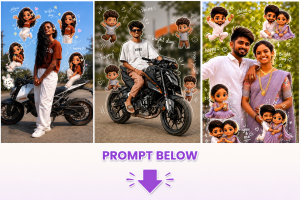
Use a real face as a reference photo. The background is the same as in the photo. The lighting is warm, soft, and clean, with subtle shadows. Around the image, add several mini chibi (3D cute style) versions of the character, while maintaining the original facial features. Chibi characters have various poses and expressions: jumping cheerfully waving sitting relaxed holding a drink cute and playful expressions Add hand-drawn white doodle elements: outline around the main body stars, hearts, sparkles motion lines small cute icons Add aesthetic handwriting such as: “shine,” “bright day,” “happy,” “smile,” etc. (casual doodle font) Overall style: clean & aesthetic composition white sticker outline soft pastel color tone high detail 3D chibi glossy look cute TEXT ADDITION : At the bottom right corner of the final image, add clean small text: Prompt = NEEDKI.com Text should white BLOCK STROK or soft tone, clearly readable but not distracting.
4️⃣ Add Stickers & Effects ✨
- 🧸 Add mini versions of yourself
- 💫 Use stars, hearts, glow effects
- 🎯 Keep it clean (don’t overdo)
5️⃣ Adjust Colors 🎨
- ☀️ Slight brightness increase
- 🔥 Warm tone filter
- ✨ Sharpen details
6️⃣ Export & Share 🚀
Use your final image for:
- 📱 Instagram posts & reels
- 🎬 YouTube thumbnails
- 💬 WhatsApp DP
- 🌐 Website banners
🔥 Why This Style is Trending
- 👀 Super eye-catching
- 📈 Increases engagement
- 💼 Great for personal branding
- ⚡ Looks professional instantly
If you have a website/blog:
- 🔗 Add AI app download links
- ✍️ Write tutorials like this
- 🔍 Use keywords like:
- “AI photo editing app”
- “Trending photo edit 2026”
- “Convert photo to chibi AI”
👉 This helps you earn via AdSense + affiliate income 💸
🎯 Final Thoughts
AI is changing everything 🚀
What used to take hours can now be done in minutes ⏱️
If you want your photos to stand out in 2026,
👉 this pop-up AI editing trend is a must-try! 💥